1.方法一
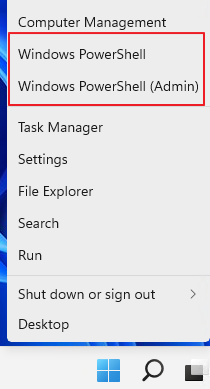
步驟1. 右鍵點擊開始選單上的Windows圖示,選擇「Windows PowerShell」。
(Get-WmiObject -query 'select * from SoftwareLicensingService').OA3xOriginalProductKey

步驟3. 等待Windows PowerShell為您提供當前PC的Windows作業系統授權金鑰。
2.方法二:
請在PE上執行
軟體. RW-Everything
讀取 BIOS 上的序號:ACPI Table → MSDM

參考:https://metapx.net/2016/10/09/how-to-get-oem-product-key/


